Full SDK and Public SDK
OpenHarmony provides two types of SDK:
- Public SDK: A toolkit for application development. You can download it with DevEco Studio. It does not include the high-permission APIs required by system applications.
- Full SDK: A toolkit for OEM manufacturers that includes the high-permission APIs required by system applications. You cannot download it with DevEco Studio.
Obtaining the Full SDK
Approach 1: Download from the CI/CD Pipeline (Recommended)
Get the Full SDK
-
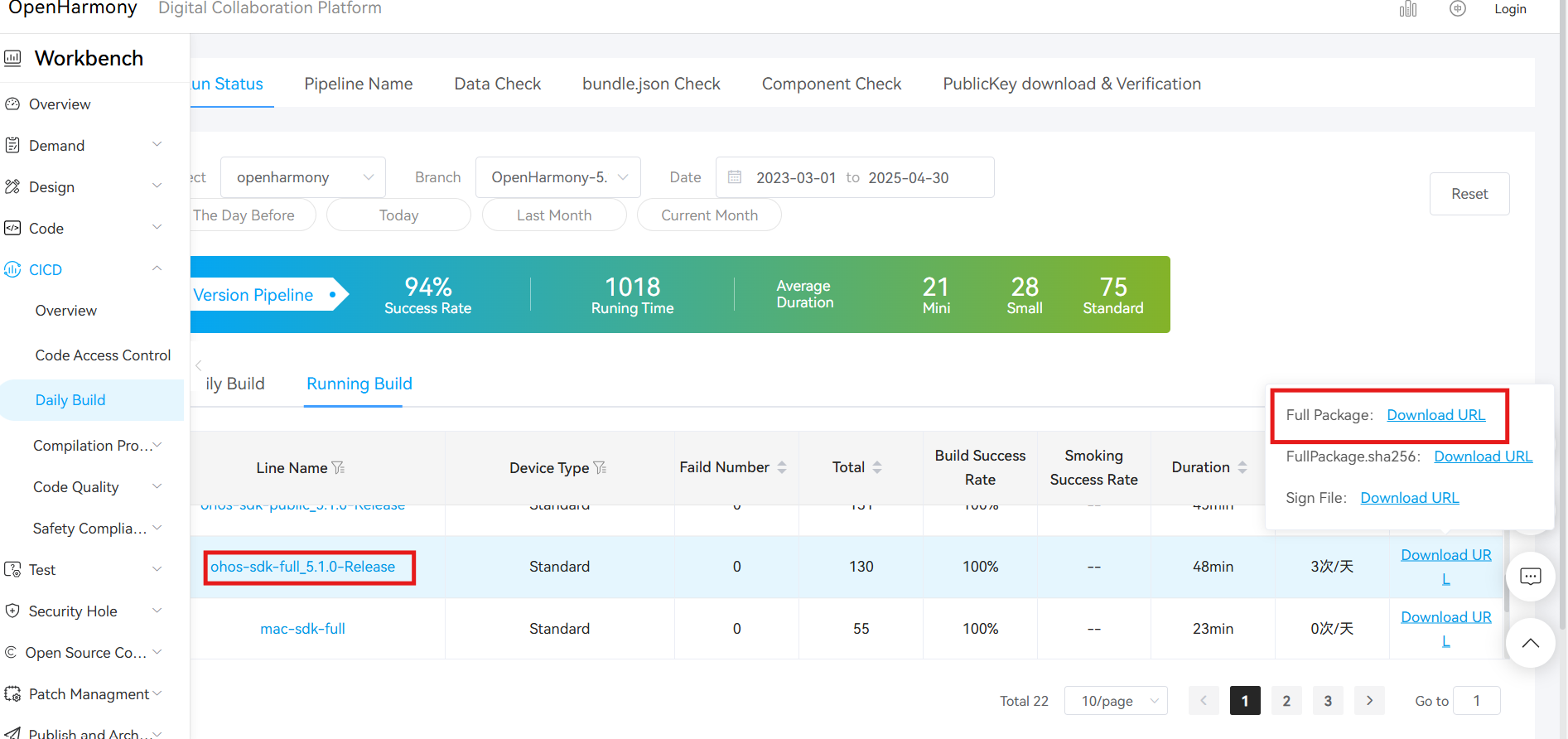
This example obtains an OpenHarmony 5.1 Full SDK from the OpenHarmony CI/CD daily build portal, which provides system images, SDKs, and other build artifacts.
Use the filters to select the
openharmonyproject, theOpenHarmony-5.1.0-Releasetarget branch, and a date or date range.In the daily or rolling build, find ohos-sdk-full_5.1.0-Release and download the full package, which includes the Full SDK for Windows and Linux. If the daily-build SDK is incompatible with your version of DevEco Studio, use the rolling-build SDK instead.
SDK Version Notice
This guide uses the
5.1.0-Releaseversion as an example, corresponding to DevEco Studio 5.1.0.👉 Make sure to select the version that matches your development requirements.
Pipeline Description Remarks ohos-sdk-public The public SDK is available for Linux and Windows platforms It is provided for application developers and does not include system interfaces that require system permissions mac-sdk-public The public SDK for macOS is available It is provided for application developers and does not include system interfaces that require system permissions ohos-sdk-full Applicable to Linux and Windows platforms. If you want to use system APIs, you need to use this SDK. Available to OEMs, including system interfaces that require access to the system mac-sdk-full Full SDK for macOS. If you want to use system APIs, you need to use this SDK. Available to OEMs, including system interfaces that require access to the system -
Confirm that you downloaded the Full SDK:
- Check whether the filename contains
full-SDK. - Check whether the API includes system APIs such as
@ohos.app.ability.abilityManager.d.ts,@ohos.app.form.formInfo.d.ts, and@ohos.bluetooth.d.ts.
- Check whether the filename contains
Replace the Full SDK
The following example replaces the Full SDK for DevEco Studio 5.1.0, API 18, on Windows.
-
Back up and remove the local SDK. Select OpenHarmony, then navigate to the directory where the original SDK is installed.
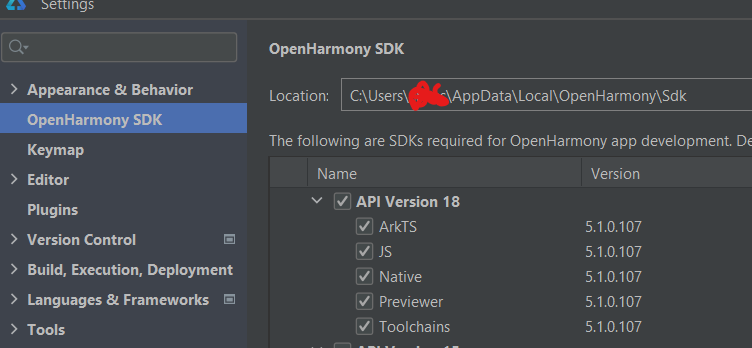
Copy the entire SDK directory, such as
18, to a backup location.Now you can remove the original SDK from its directory.
-
Prepare the downloaded SDK so that DevEco Studio can recognize it. For example, the daily-build archive
version-Master_Version-OpenHarmony_5.1.0.103-20250415_020044-ohos-sdk-full_5.1.0-Release.tar.gzhas the following directory structure. It contains SDK files for Linux and Windows, with archives for ETS, JavaScript, native development, the Previewer, and toolchains.├── version-Master_Version-OpenHarmony_5.1.0.103-20250415_020044-ohos-sdk-full_5.1.0-Release │ ├── manifest_tag.xml │ └── ohos-sdk │ ├── linux │ │ ├── ets-windows-x64-5.1.0.103-Beta1.zip │ │ ├── js-linux-x64-5.1.0.103-Beta1.zip │ │ ├── native-linux-x64-5.1.0.103-Beta1.zip │ │ ├── previewer-linux-x64-5.1.0.103-Beta1.zip │ │ └── toolchains-linux-x64-5.1.0.103-Beta1.zip │ └── windows │ ├── ets-windows-x64-5.1.0.103-Beta1.zip │ ├── js-windows-x64-5.1.0.103-Beta1.zip │ ├── native-windows-x64-5.1.0.103-Beta1.zip │ ├── previewer-windows-x64-5.1.0.103-Beta1.zip │ └── toolchains-windows-x64-5.1.0.103-Beta1.zip -
Under
xxx\\Sdk\\, create a directory named after the API version, such as18. Extract the compressed files into this directory to produce the structure shown below.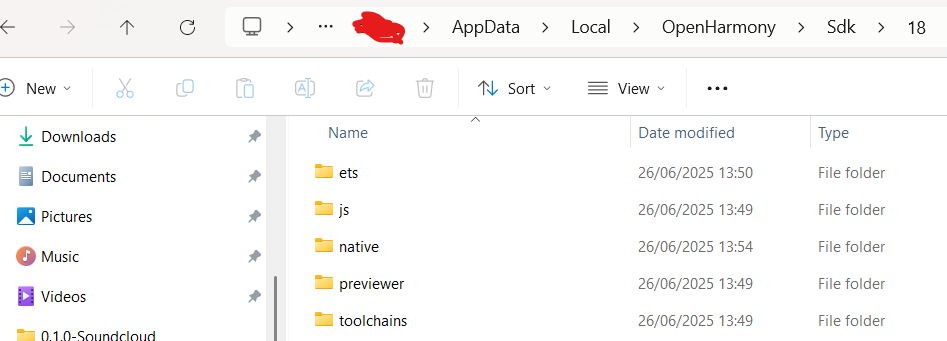
-
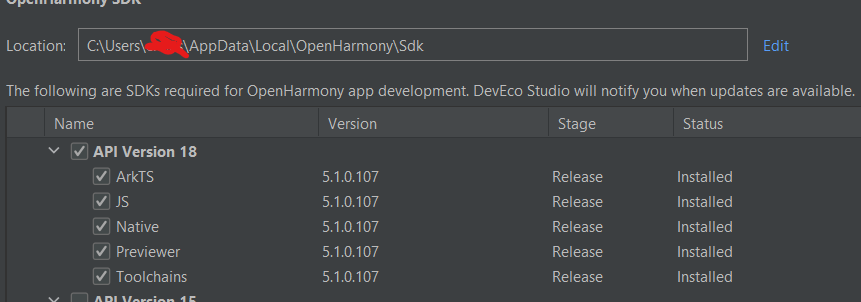
Verify the SDK in the IDE. After the IDE loads the Full API, rebuild the project.
Approach 2: Build from Source
You can also compile the Full SDK from the OpenHarmony source code and install it manually in DevEco Studio. Replace the SDK as described in Approach 1.
For instructions, see How to Compile the Full SDK.