Overview
Module Development Guide
Before You Begin
Make sure you have gone through the Environment Setup Guide and studied the development tutorial.
Why Module Development?
As a project grows, placing all code in one module causes problems:
- Code becomes difficult to organize and maintain.
- Build times increase.
- Changes to one feature may affect others.
- Code and resources cannot be shared efficiently across modules.
Shared packages address these problems.
Shared Packages: HAR and HSP
A shared package is similar to an Android library. It enables code and resource sharing.
OpenHarmony provides two types of shared package:
-
HAR (Harmony Archive) — a static shared package
-
HSP (Harmony Shared Package) — a dynamic shared package
The code and resources in a HAR, a static shared package, are compiled with the consuming module. When several modules consume the package, each build output contains an identical copy.
In contrast, HSP, as a dynamic shared package, can be compiled independently. At runtime, only a single copy of its code exists within a process, as illustrated in the figure below.
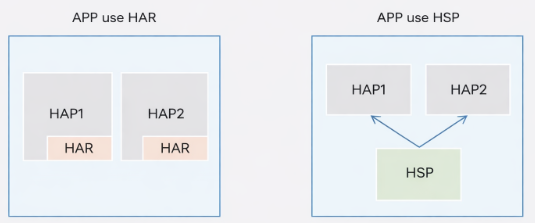
HSPs (dynamic shared packages) address the following issues:
- When multiple HAPs reference the same HAR, the app package size increases due to duplicated copies.
- When multiple HAPs reference the same HAR, certain state variables inside the HAR cannot be shared.
In general, if the shared code and resources are used within a single application, it is recommended to use a dynamic shared package (HSP). If the package is intended to be used as a dependency by application modules, a static shared package (HAR) can be chosen.
Select the appropriate package type based on the application's requirements.
HAR and HSP Comparison
| Feature | HAR (Static) | HSP (Dynamic) |
|---|---|---|
| Compilation | Compiled with consumer | Compiled independently |
| Code Copies | Multiple copies (per consumer) | Single copy at runtime |
| Package Size | Larger (due to duplication) | Smaller (shared code) |
| State Sharing | Cannot share state variables | Can share state across modules |
| Use Case | Module dependencies | Internal application sharing |
| Configuration Complexity | Lower | Higher |
What You Will Learn
Through this module development guide, you will master:
- Create Shared Modules: Set up and configure HAR and HSP modules in your project
- Manage Dependencies: Add and configure shared package dependencies using multiple methods
- Use Shared Resources: Call methods, classes, components, and pages from shared packages
- Navigate Between Modules: Implement page navigation across different modules
- Deploy Multi-Module Applications: Configure and run applications with multiple packages
- Best Practices: Understand guidelines for effective shared package usage and troubleshooting
Next Steps
Ready to get started? Begin with Create Module Project to learn how to set up your first modular HarmonyOS application.