Creating a Project
Fields
- Name: The name of your application.
- Bundle name: A reverse-domain-style identifier that follows the pattern
com.organisation_name.application_name. - Location: The parent directory in which the project directory will be created. For example, if you set the location to
~, the project files will be created in~/project_name. - SDK version: Choose the version that matches the OpenHarmony version on your device. For the emulator, choose 6.1 (API level 23).
- Template: An optional project template. The default is
Empty Ability.
Note
- A bundle name must contain at least three segments separated by periods (
.). Each segment can contain only letters, digits, and underscores (_). Example:com.example.myapplication. - The first segment must start with a letter. Other segments can start with a letter or digit. Every segment must end with a letter or digit. Example:
com.01example.myapplication. - Consecutive periods are not allowed. For example,
com.example..myapplicationis invalid. - A bundle name must contain between 7 and 128 characters.
Creating the Project
Open the Create Project tab.
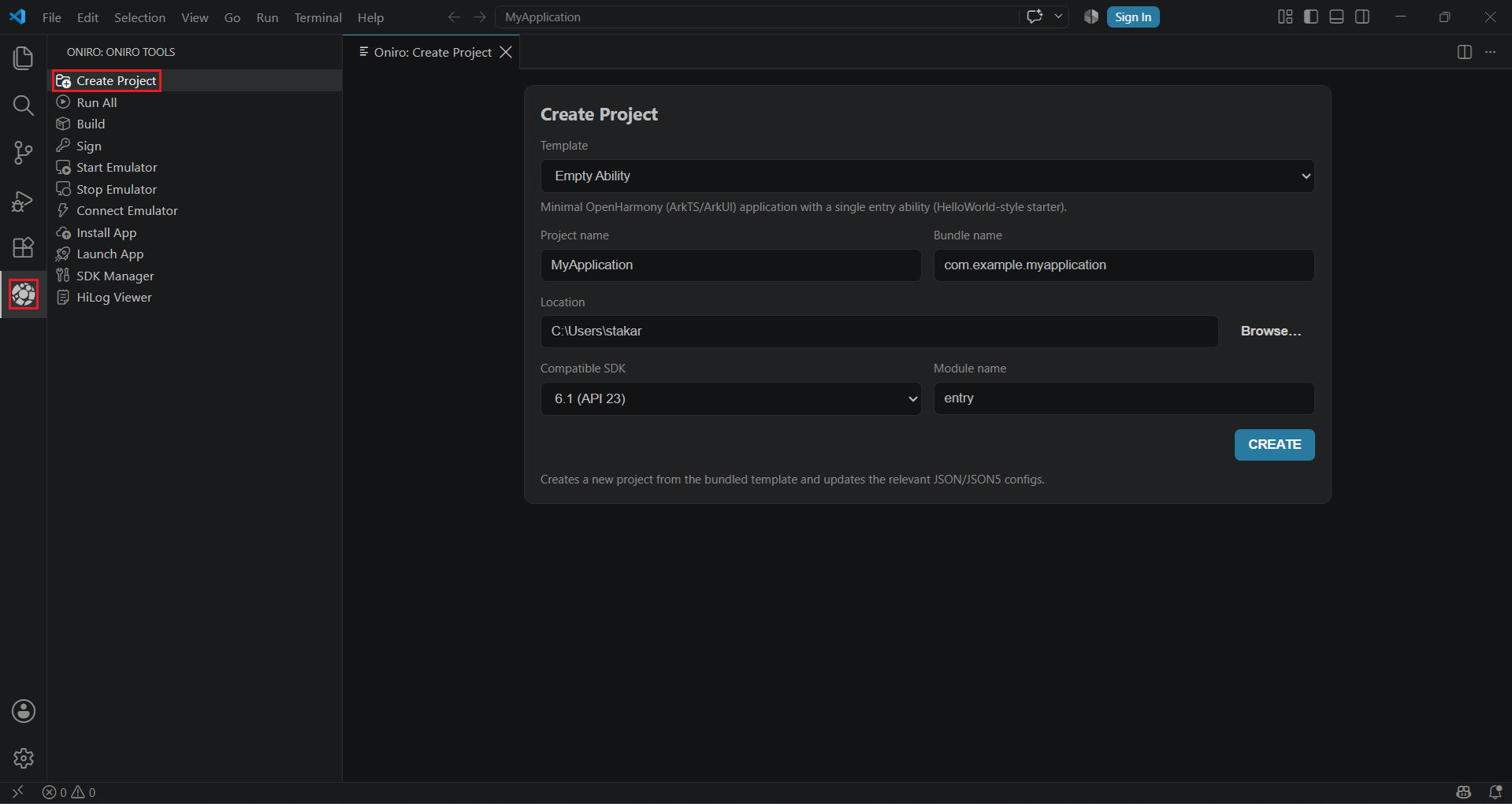
Configure the fields and press "Create".
Run oniro-app create --name <app_name> --location <location> --bundle <bundle_name> --sdk <api_level>.
This creates a simple "Hello world" app, ready to be built and installed.